Create character, product and scene images to use on their own or as references for videos and storyboards.
DOLA
Seedream
Seedream 4.5
Seedream 5.0 Pro
Enter a prompt with up to 3 reference images. Each job saves one primary original image to your library.
1:12:33:44:39:1616:9
In Operations: select Dola → Image → Seedream. Requires a Dola account with access to the model.
GOOGLE FLOW
Nano Banana
Nano Banana Pro
Nano Banana 2
Nano Banana 2 Lite
Create images from descriptions or reference images. Choose a Google Flow model and manage images alongside your video projects.
In Operations: select Google Flow → Image. Model access and download quality depend on your Google Flow account.
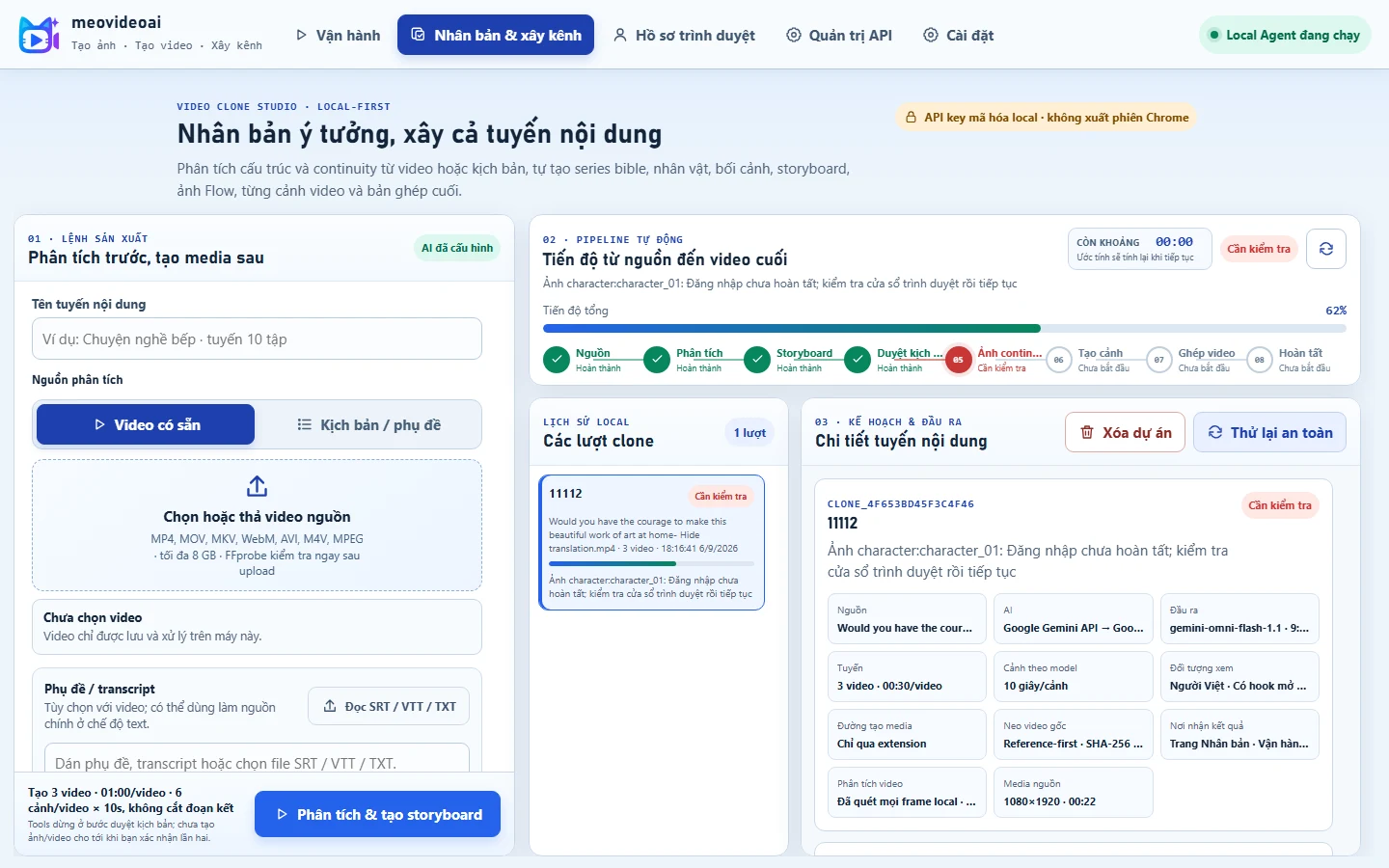
Clone Video & Channel Builder can use Seedream 4.5, Seedream 5.0 Pro, Nano Banana Pro or Nano Banana 2 for storyboard images. AI provider accounts and credits are separate from the Studio license.
GPU VIDEO UPSCALING
Downloaded videos. Higher resolution.
AI processing on your Windows PC, using a Vulkan-compatible GPU.
1080pFull HD
1440pQHD
2160p4K
Automatic after download
Open Settings → GPU & upscale defaults, choose a resolution and save. You can also set a separate level for an Operations project or a Clone run.
Batch upscale existing videos
Click Upscale downloaded videos, select a project, Clone run or all projects. Scan the list, choose a resolution and start; pause, resume or stop the batch as needed.
Preserves landscape/portrait framing, FPS and audio.
Shows per-video and batch progress; videos already at the target resolution are kept as they are.
Processes videos one at a time on the GPU while Studio continues generating and downloading.
Keeps the original if upscaling fails. Retrying an upscale does not submit a new video generation request.
4K is the upscaled output resolution, not native 4K generation. Quality and speed depend on the source video and GPU. Recombine scenes after upscaling to include them in a new final video.
Every project on one screen
From your first prompt to a finished video.
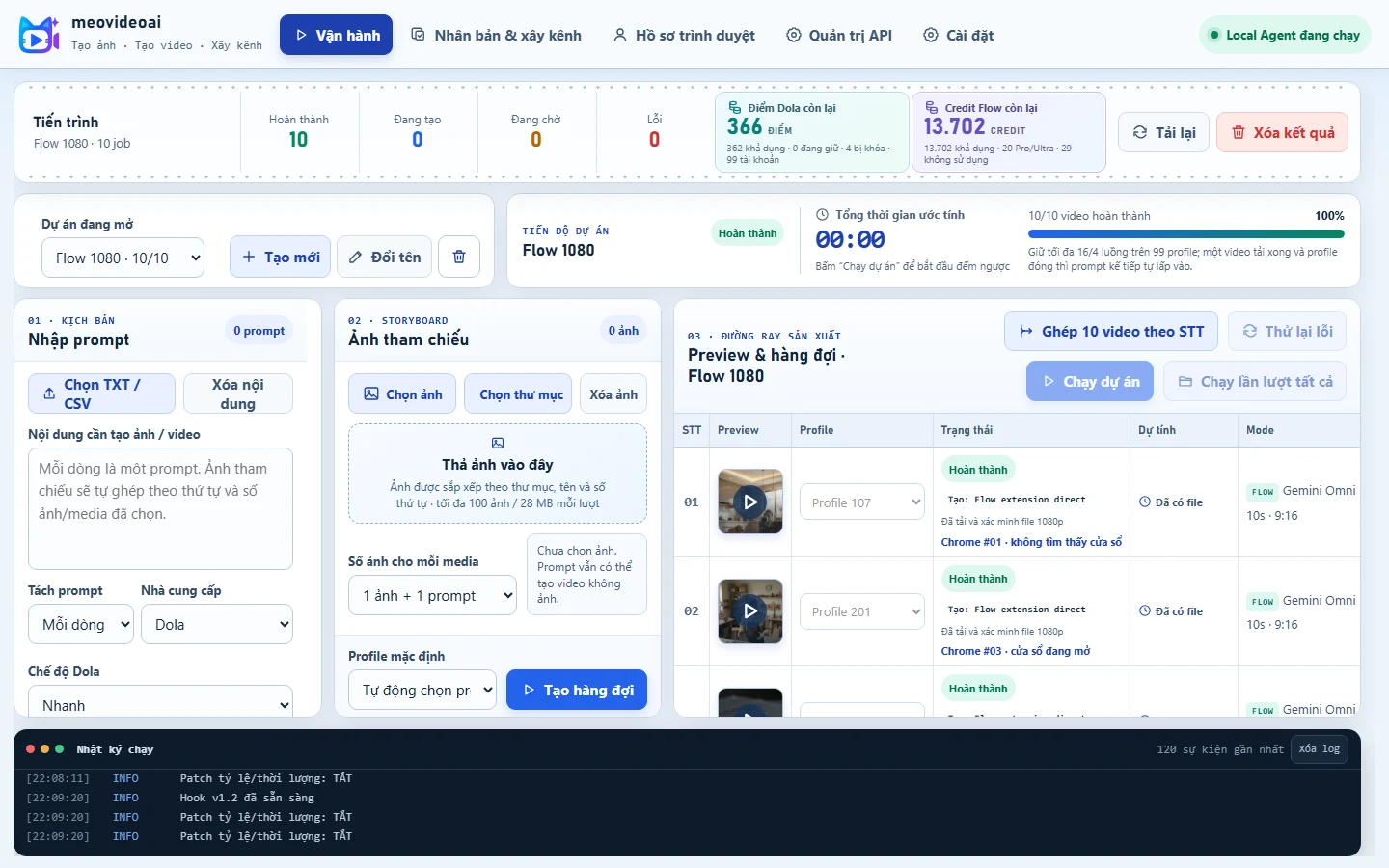
Create multiple scenes, track each video's progress, and open results within the project without juggling separate tools.
∞ total videos3 creative engines1 Studio
MEOVIDEOAI 1.1.7 · ACTUAL PRODUCT SCREENSHOT
Creative workflow
Three steps from source to final video.
Start with a prompt, image, video, or script; choose a model; then manage each scene and the final assembly.
01
Bring your idea into Studio
Add prompts, images, source videos, TXT/CSV files, or subtitles to start one clip or a whole series.
Supports multiple source types
02
Choose the right engine
Seedance for videos up to 30 seconds; Google Flow for Nano Banana images and Veo 3.1 videos.
A clear model choice for every scene
03
Complete your content series
Preview each scene, assemble them in order, and develop new episodes from your existing project.
Easy-to-manage output files
Multiple task queues on one screenMeoVideoAI 1.1.7 screenshot · status, duration, and results in one place.Clone Video & Channel BuilderMeoVideoAI 1.1.7 screenshot · storyboard, characters, scenes, and content series in one project.
Key features
One toolkit for the entire content lifecycle.
Create media, maintain continuity, develop series, and manage outputs with no cap on total video count imposed by Studio.
Google Flow imagesSeedance & Veo videoClone & Channel BuilderNo queue limit imposed by StudioMultiple projectsPreview & publish
Models, duration & quality
Choose the right engine for each format.
From short social clips to 30-second scenes, continuity images, and landscape/portrait videos for a complete content series.
2.5
Seedance 2.5
5, 10, or 30 seconds for scenes with multiple beats, product advertising, and cinematic content.
UP TO 30S2.0
Seedance 2.0
5, 10, or 15 seconds for social clips, product motion, and short variations.
UP TO 15SNB
Google Flow · Nano Banana
Create and edit images with Nano Banana 2, 2 Lite, or Pro for consistent characters and settings.
IMAGEV3
Google Flow · Veo 3.1
8-second scenes with Fast/Lite, 16:9 or 9:16; 720p originals with 1080p preferred where supported.
08S / SCENE
FOR CREATORS
Create polished clips faster.
Choose the right model, aspect ratio, and duration for short videos, ads, storytelling, and social content.
FOR STUDIOS
Produce more. Stay organized.
Manage multiple projects, scenes, and outputs on one screen without a cap on total video count.
FOR CHANNEL BUILDERS
One idea, many episodes.
Maintain characters, settings, and storytelling structure to develop long-term content for your channel.
Easy to install
Windows 10/11 x64
Download the ZIP and extract all files into a new folder.
Internet access for license verification and provider services
The browser for provider sign-in is included; GPM Login is optional
No need to install Python, Node.js, or development runtimes
May we use measurement cookies for page views, engagement time, scrolling and checkout steps? If configured, Google/Meta tags will also be enabled. Passwords, tokens and form contents are not recorded. View privacy policy.
Declining does not affect sign-in or purchases. Change your choice at any time using the Cookies & measurement button.
USD prices use 25,000 VND/USD and are rounded up to whole dollars. Bank transfers are charged in the exact VND amount shown at checkout. International card payments are not available yet.